---
title: How to Add a Product to Your Google Business Profile
description: How to Add a Product to Your Google Business Profile
---
[Skip to content](https://go.standardprocess.com/insite/how-to-add-a-product-to-your-google-business-profile#main-content)
English
Show submenu for translations

Open main navigation
Close main navigation
- English
Show submenu for translations
How can we help you?
- There are no suggestions because the search field is empty.
1. [inSITE Knowledge Base](https://go.standardprocess.com/insite?hsLang=en)
2. [Marketing](https://go.standardprocess.com/insite/marketing?hsLang=en)
3. [SEO](https://go.standardprocess.com/insite/marketing?hsLang=en#seo)
# How to Add a Product to Your Google Business Profile
Adding products to your Google Business Profile can increase visibility, attract potential customers, and encourage more sales by highlighting the products you offer directly in search results. Follow the steps below to learn how to add products to your Google Business Profile:
1\. In your search browser, search **"Google Business"** and log in.
2\. Click **"View profile."**
3\. Click **"Edit products."**
4\. Click **"Get started."**
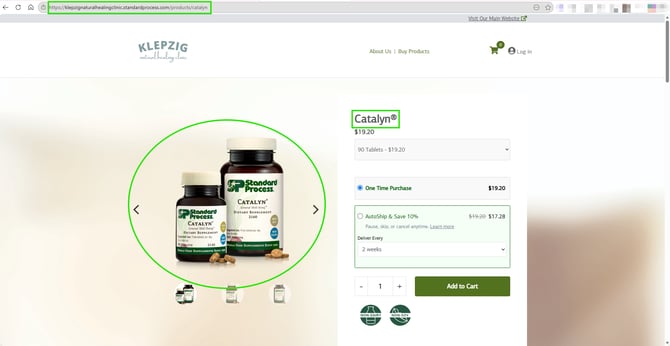
5\. Find the product you want to add on your inSITE. On the product page, you will have all of the information you need to add the product.
6\. Add the product name, category, description, and product landing page URL.
7\. Add a photo of the product. You can copy and paste the image on the product landing page.

8\. Click **"Publish."**
9\. Repeat to add as many products as you would like.
**Important Note:** Add only your top or best-selling products to keep your profile clean and effective. Do not include the price of the products in the listing. This can create confusion if prices change and aren't updated. Customer will be able to see the price of the product when they click the link.
- [Getting started](https://go.standardprocess.com/insite/getting-started?hsLang=en#main-content)
- [inSITE Shopify App](https://go.standardprocess.com/insite/getting-started?hsLang=en#insite-shopify-app)
- [inSITE Templated Websites](https://go.standardprocess.com/insite/getting-started?hsLang=en#insite-templated-websites)
- [Marketing](https://go.standardprocess.com/insite/marketing?hsLang=en#main-content)
- [Email](https://go.standardprocess.com/insite/marketing?hsLang=en#email)
- [Social Media](https://go.standardprocess.com/insite/marketing?hsLang=en#social-media)
- [SEO](https://go.standardprocess.com/insite/marketing?hsLang=en#seo)
- [Reports](https://go.standardprocess.com/insite/reports?hsLang=en)
- [Settings](https://go.standardprocess.com/insite/settings?hsLang=en)
- [Support](https://go.standardprocess.com/insite/support?hsLang=en)
- [Integrations](https://go.standardprocess.com/insite/integrations?hsLang=en)
- [Meta](https://go.standardprocess.com/insite/meta?hsLang=en)
- [Default HubSpot Blog](https://blog.standardprocess.com/)
[](http://www.standardprocess.com)
[mailto:email@email.com](mailto:email@email.com)
Copyright © 2026, Standard Process Inc.