---
title: How to Set Up Automatic Discounts at Checkout in Shopify
description: Setting up automatic discounts at checkout in Shopify
---
[Skip to content](https://go.standardprocess.com/insite/how-to-set-up-automatic-discounts-at-checkout-in-shopify#main-content)
English
Show submenu for translations

Open main navigation
Close main navigation
- English
Show submenu for translations
How can we help you?
- There are no suggestions because the search field is empty.
1. [inSITE Knowledge Base](https://go.standardprocess.com/insite?hsLang=en)
2. [Getting started](https://go.standardprocess.com/insite/getting-started?hsLang=en)
3. [inSITE Shopify App](https://go.standardprocess.com/insite/getting-started?hsLang=en#insite-shopify-app)
# How to Set Up Automatic Discounts at Checkout in Shopify
In order to create an automatic discount at checkout, you first need to create a collection with all Standard Process and Medi Herb products. To do this, follow the steps below:
### How to Create a Collection in Shopify
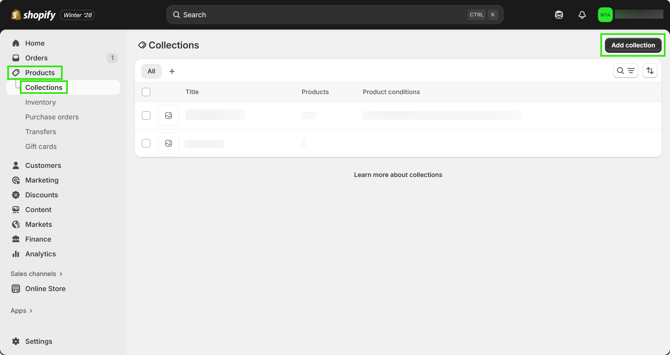
1\. Log into your Shopify admin account
2\. Click "Products" on the left-hand side of the screen
3\. Click "Collections"
4\. Click "Add collection" on the upper right-hand corner
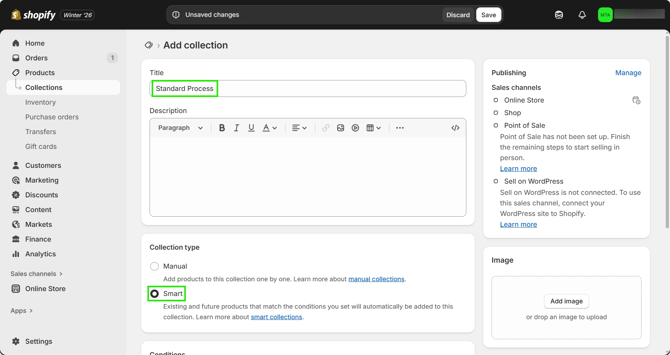
5\. Create a clear title for your collection (e.g., Standard Process)
6\. In the "Collection type" section, select "Smart"
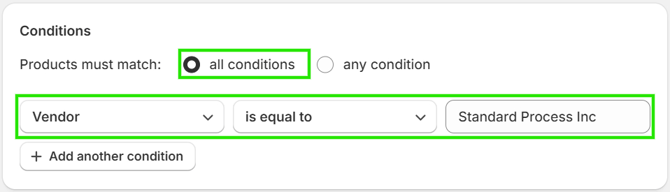
7. In the "Conditions" section, ensure that "all conditions" is selected
8\. Click "Tag" and change it to "Vendor"
9\. Ensure the next drop down is set to "is equal to"
10\. In the blank section, type "Standard Process Inc"
11\. Click "Save" at the bottom right-hand corner
### How to Set Up Automatic Discounts at Checkout in Shopify
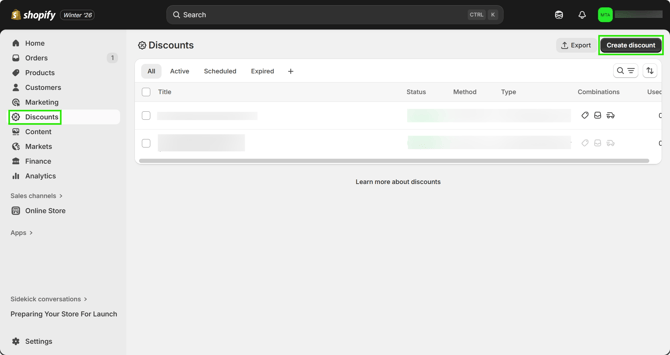
1\. Click "Discounts" on the left-hand side of the screen
2\. Click "Create discount" at the top right-hand corner
3\. Click "Amount off products"
4\. Select "Automatic discount"
5\. Title the discount (customers will be able to see this title)
6\. Select your desired discount value
7\. Ensure the "Applies to" section has "Specific collections" selected
8\. Search, select, and add the collection of Standard Process products created earlier
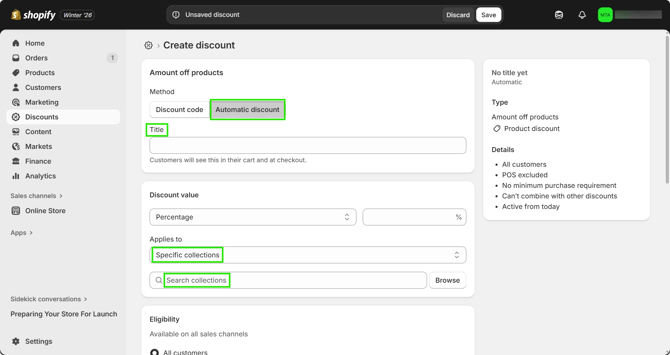
9\. Click "Save" at the top of the screen
- [Getting started](https://go.standardprocess.com/insite/getting-started?hsLang=en#main-content)
- [inSITE Shopify App](https://go.standardprocess.com/insite/getting-started?hsLang=en#insite-shopify-app)
- [inSITE Templated Websites](https://go.standardprocess.com/insite/getting-started?hsLang=en#insite-templated-websites)
- [Marketing](https://go.standardprocess.com/insite/marketing?hsLang=en#main-content)
- [Email](https://go.standardprocess.com/insite/marketing?hsLang=en#email)
- [Social Media](https://go.standardprocess.com/insite/marketing?hsLang=en#social-media)
- [SEO](https://go.standardprocess.com/insite/marketing?hsLang=en#seo)
- [Reports](https://go.standardprocess.com/insite/reports?hsLang=en)
- [Settings](https://go.standardprocess.com/insite/settings?hsLang=en)
- [Support](https://go.standardprocess.com/insite/support?hsLang=en)
- [Integrations](https://go.standardprocess.com/insite/integrations?hsLang=en)
- [Meta](https://go.standardprocess.com/insite/meta?hsLang=en)
- [Default HubSpot Blog](https://blog.standardprocess.com/)
[](http://www.standardprocess.com)
[mailto:email@email.com](mailto:email@email.com)
Copyright © 2026, Standard Process Inc.